Subtitel

A blog by Juri Urbainczyk | Juri on Google+ | Juri on Twitter | Juri on Xing

Showing posts with label Mobile. Show all posts

Tuesday, September 23, 2014

Devoxx vs. JavaZone

Every now and then I get queried which of the Java and Web conferences in Europe I would recommend. Often, the most sensible answer seems to be: “the one closest to you”.
Nevertheless, since I visited JavaZone in Oslo in September 2014, I think it may be time to make a thorough comparison after all.
But which are the criteria? The number of rock star speakers? The volume of soft drinks available for free? Alas, I came up with the following criteria:

Variety of topics
This is especially important because most people visit conference in order to peak over their horizons or to deep-dive into certain areas. As a minimum, conferences should cover the topics architecture, mobile, methods, coding and research, while all might bear different names or might be slit up into several sub-categories.
Quality of talks
Of course, the presentations must have content and meaning and they must be given in an inspirational manner as well. These are high expectations, and not many can live up to them. Especially talks, which center around products or have a high marketing potential, tend to be boring and to be of low quality.
Choice & Availability
If you have picked up your favourite talk and you can’t see it, because the room is crammed, that’s bad. It’s even worse if there is no sensible alternative, because not enough parallel tracks are available.
Community feeling
You also visit a conference in order to meet other developers and to talk to fellow architects. This is enhanced if the conference introduces a feeling of community into all its visitors. This can be achieved via events which include all or many visitors, by special after-dinner events, by talks which address all of the community and so forth.
Organisation & Infrastructure
You need to find your way to the conference, you have to know the program, must find the correct room and you need a working wi-fi. Especially the last issue is always a source of trouble, but it’s getting more and more important every year.
Venue & after-conference program
If you want to enjoy your conference, you need good lighting, cosy seating, and a venue which makes you want more of it. And in the night you need some distraction from all the hard-brained conference stuff, in order to be fit again next day.
Food & beverages
Everyone who ever organized a party knows: food is the one single most important thing. Thre is a saying “full belly does not easily study”, but that’s even more true for an empty stomach.

For a comparison, I gave each of the conference between 0 and 5 points for each of the criteria. The result looks like this this:

Criterion
Devoxx
JavaZone
Variety of topics
4
3
Quality of talks
4
4
Choice & Availability
4
2
Community feeling
5
4
Organisation & Infrastructure
5
5
Venue & after-conference program
4
4
Food & beverages
2
5

Let me explain, how I came up with the numbers:
Variety of topics: Devoxx is in lead, because it covers nearly any topic one can think of. JavaZone is only shortly behind since the program also is very versatile.
Quality of talks: The quality is above average for both conferences. Due to the sheer amount of sessions, there are in absolute numbers more mediocre talks at Devoxx, but this does not lead to a full point more for JavaZone.
Choice & Availability: Devoxx is clearly better here because all of its talks are in English (JavaZone has Norwegian talks still). Furthermore, the conference is longer (3 vs. 2 days) and contains more parallel sessions. So, you’re in for some hard decisions at Devoxx. Nevertheless, Devoxx does not earn the full score, because it is so over crowded, that you cannot see all the talks you want.
Community feeling: JavaZone is a true community conference. The same is true for Devoxx, which is a little bit ahead, because there are Keynotes (not at JavaZone) and opening and closing talks which appeal to the whole of the visitors.
Organisation & Infrastructure: This is excellent at both conferences and also includes the awesome websites and the (mostly) working wi-fi.
Venue & after-conference program: Devoxx can gather further points here because it offers an evening program at two days. But this is reduced by the venue being too much outside of the city center.
Food & beverages: Food is traditionally poor at Devoxx and excellent at JavaZone.  Devoxx has 2 points, because of its Belgium Fries night.

Which one of the conferences to prefer? It depends on which one is closest…

Tuesday, November 20, 2012

Bots, brains and beer: looking back on Devoxx 2012


It’s barely one week since Devoxx and I already miss it. For the four of us, software architects and developers from Frankfurt, Germany, Devoxx started with Belgian beer (s. picture). And Belgian beer is definitively for my liking! Thus, the next morning woke me with a slight headache and big thirst.
Belgian Beer up close
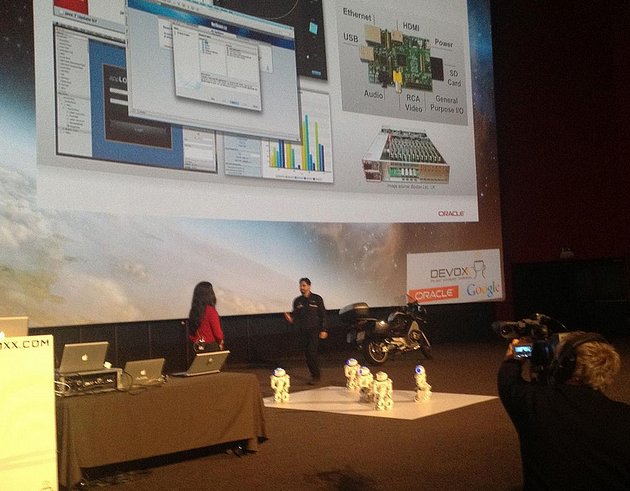
 Alas, that did not matter, since the conference began with a dance performance, done by five NAO robots (s. picture). That hinted at a “sub-theme” of Devoxx 2012: robotics, which is great, because inter-disciplinary work can be very engaging and generate new ideas. After the robo dance Devoxx UK was announced: another split-off which will be held during March 2013 for the first time. Then the keynotes came.
Robo dance
The keynotes – we had better ones at Devoxx. The Oracle keynote was boring to the core and only consisted of marketing. This trend, which already started last year, materialized now and that’s not for the better of Devoxx. After the Oracle people went way too much over time and I nearly fell asleep, then came Neal Ford. Unfortunately, he was not as inspiring as in the last years. What was his central topic anyway? Although, he still had some interesting points to make, the inspiration which I so much long for in keynotes was missing.

The highlight of the first day way definitely Kirk Knoernschild and his talk “Architecture all the way down”. He says architecture is a way to cope with complexity but he also presents us the “architecture paradox”: everything we introduce in order to tackle complexity generates even more complexity. Thus, he asks, how can we overcome that? His central message is, that we have to care more about modularity. Taking apart the software into loosely coupled modules is the only way to reduce complexity and confine changes to certain areas of the system. He also states that we (software developers) think a lot about services and classes, but not enough about modules, which are “somewhere” in between. Moreover, Java does not provide us with sufficient tools for building true modules. I couldn’t agree more.

Day One closed with another instalment of great Belgian fries and some Belgian beer afterwards.

Next day began with the Google keynote by Tim Bray, which unfortunately, didn’t live up to my expectations either. Again, there was too much marketing and not enough message. Jerome Dochez made up for it, in his excellent talk about dependency injection. Above all, I recall one of his remarks on OSGi: “Do not use it, unless you have to add modules at runtime”. His warning about introducing unnecessary complexity with OSGi should be heard. The day went on with excellent talks on Vaadin 7, HTML5 Webapps, and JavaScript Unit Testing with Jasmine.

Thursday evening started with the James Bond Movie “Skyfall”, which was better than I expected. Afterwards everyone went to the nightclub “Noxx” which was book exclusively for Devoxx that night – and they served Belgian beer as well.

Friday started out with “Cloud Robotics”, went on with Daniel Kurka’s excellent presentation on “mgwt – GWT goes mobile” and closed with Adam Bien live coding Java EE. By the way, Mr. Bien was quite entertaining as always, but recommending developers to fake certain aspects of the software to please the architects should not be taken too seriously.
Where are you from?
Bottom line: Devoxx was an amazing experience once again, which I recommend to everybody who is interested in Java and web programming. That’s lots of energy and enthusiasm there in those 3.500 Devoxxians from all over the globe (s. picture of whiteboard), and you can feel it. The awesome twitter wall was put to good use again and the only thing I have to criticize concerning organisation is the catering: please give us some more and some better food, cake and lunch next year! Is it because of the diet that some people were missing? Matt Raible, for instance, or Joshua Bloch and Uncle Bob. Bring’em back! There are also some topics I’d like to hear about at Devoxx next time: Sencha, Liferay and Node.js for example. Come on guys: I’m looking forward to meeting you at Devoxx, Antwerp 2013.

Monday, August 27, 2012

Textfield with an image: how to write a Sencha Touch 2 component


Let's assume we'd want to write a component, which displays a string together with an image. This would come in handy, if we need to display the name of a customer (e.g. 'Pfefferminzia') and it's logo. The following picture shows the component in action - in the second row of the dialog.


We can achieve that by combining an normal textfield ('Ext.field.Text') with a label ('Ext.Label') which contains the corresponding image. Thus, we need a conatiner, which surrounds the textfield and the image and keeps them together. Lucky as we are, Sencha Touch already offers such a component, called 'Ext.Container'. Since we want name and image to appear on the same line one after the other, we choose a 'hbox' layout for our container. At this point, out new component looks like this:
Ext.define("myapp.view.CustomerDisplayField", {
    extend: 'Ext.Container',

    xtype: 'customerdisplayfield',
    
    config: {   
        layout: 'hbox',
        items: [
            {
                xtype: 'textfield',
                label: 'Customer',
                labelWidth: '37.4%',
                readOnly: true,                               
                flex: 4       
            },
            {
                xtype: 'label',
                html: '<span style="float:right; margin-right:10px;"><img height="32px"  src="resources/images/customer.png"/></span>',
                padding: '6 0 0 0',
                flex: 1       
            }       
        ]       
    }
});

This is all very well, but something is missing: we need the image to change accordingly, whenever the customer changes. In order to achieve this, we add a 'change' listener to the text field. Each time the name of the customer is change (e.g. via a call to 'setvalue()') the image should change as well. But, in the 'change' handler we need to call a function on the label sub-component. How do we get a hold on that? We could, for instance, do something like 'this.up().getComponent(1)' but that would make our component dependent an the structure and on the *order* of the sub-compoenents - which is not good.

Therefore, we add an 'initialize' handler to our component and create all the sub-components in this handler.
Thus, we always have a variable which points directly to our 'image label', which make our life quite easy.
We also add a 'setUrl()' method to our image-label and a 'setValue()' method to our component as a whole. Then we are ready and our source code looks like this:
Ext.define("myapp.view.CustomerDisplayField", {
    extend: 'Ext.Container',

    xtype: 'customerdisplayfield',
   
    textfield : null,
    
    config: {   
        layout: 'hbox',
       
        listeners: {
            initialize : function() {
               
                //this label displays the icon
                var mylabel = Ext.create( 'Ext.Label', {
                    padding: '6 0 0 0',
                    flex: 1,
                   
                    setUrl : function(url) {
                      this.setHtml('<span style="float:right; margin-right:10px;"><img height="32px"  src="'+url+'"/></span>');
                    }
                });
               
                //set a default image
                mylabel.setUrl("resources/images/warning.png");
               
                //this textfield displays the customer's name
                var mytext = Ext.create('Ext.field.Text',{
                    label: 'Customer',
                    labelWidth: '37.4%',
                    readOnly: true,                               
                    flex: 4,
                    listeners: {   

                        change: function(field,newvalue,oldvalue) {
                            //get the correct url for my new customer
                            var url = customernameToUrl(newvalue);                       
                            mylabel.setUrl(url);                       
                        }
                    }
                });                       
               
                this.add(mytext);
                this.add(mylabel);
               
                this.textfield = mytext;
            }
        }       
    },
   
    setValue : function(newvalue) {
        this.textfield.setValue(newvalue);
    }
});

Saturday, January 28, 2012

„RIA goes mobile“ : My article on Sencha Touch published in Mobile Technology


In the last years I had the chance to develop some applications with the ExtJS RIA framework and I was deeply impressed by the flexibility and power of the framework. I think, that the programming model, meaning the way how a programmer can use the framework to implement logic and presentation, is largely the reason for this. Therefore, it was quite clear to me, that I had to try out Sencha Touch as well, since it is simply put ExtJS for mobile devices.

Sencha Touch is a framework for developing mobile web applications on the basis of HTML5, CSS3 and JavaScript. The resulting web applications can be run on nearly any mobile browser, eliminating the differences of the platforms for the developer. Thus, you only need one code base and don’t have to develop a separate application for every platform.

My article can be found in full length in the January issue of “Mobile Technology” magazine (http://mobile360.de/mobiletechnology). The article contains an in depth description of the framework, using a web app I implemented for A:gon Solutions (http://www.agon-solutions.de) as an example. The idea behind the app ist hat the company needed a possibility to gain feedback on the many customer events. In the app the customer can score the presentations and talks of the event and give recommendations on what he expects from the next workshops. Actually, the web app is deployed on Google App Engine which was a first timer for me (http://agonfeedback.appspot.com/).
Considering the special situation, a mobile user finds him in, the design of the web app focuses on ease of use and simplification. Therefore, I abandoned little checkboxes and complex selection boxes in favor of big buttons and clear symbols. Also, swipe gestures are used to switch from one page to another or back, if needed. Sencha Touch really makes this easy, by carefully integrating these “swipe” events into the standard programming model of the framework.

Working with the Sencha Touch really is fun, especially if you are already acquainted with ExtJS or another similar JavaScript framework. With this kind of experience getting into the framework and coming up with first results is a matter of hours at most. Only some lines of code are needed in order to build complete application Frontends. The following code snippet shows a class, which defines the basic properties of the app:

var App = new Ext.Application({     
    name               : 'FeedbackApp',
    defaultUrl         : 'index.html',     
    launch             : function () {                               
          FeedbackApp.ViewportClass = Ext.extend(Ext.Panel, {
                fullscreen: true,
                items: [ carousel ] // carousel defined elsewhere         
          });                
          this.viewport = new FeedbackApp.ViewportClass();     
   }
});      

As a mobile framework, Sencha Touch also contains elements to cope with device orientation (landscape vs portrait). Although this is possible it proved to be not so easy as the rest and maybe needs some more thinking on the side of the framework developers. One more lesson I learned while doing the app: don’t use absolute sizes for your GUI elements since you will run into trouble on the very first phone you did not test it with.